Inventory Posting Setup Does Not Exist – How to Fix the Error in Microsoft Dynamics NAV / Business Central
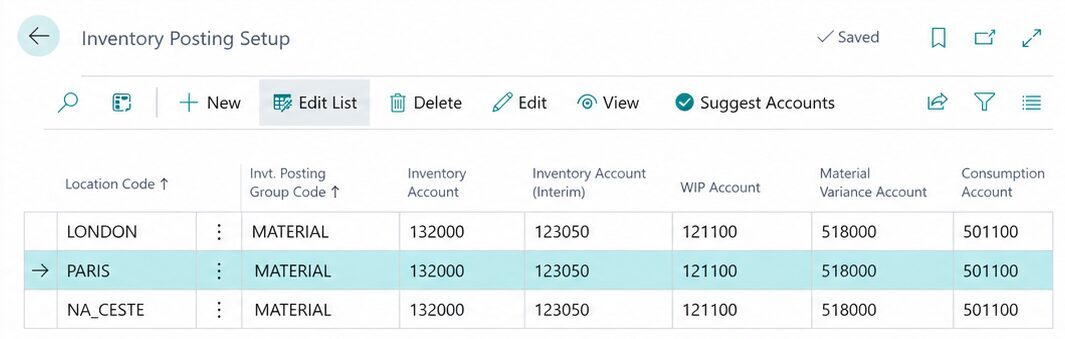
When posting inventory documents in Microsoft Dynamics NAV or Microsoft Dynamics 365 Business Central, you may encounter the following error message:
"Inventory Posting Setup does not exist. Identification fields and values: Location Code='PARIS', Inventory Posting Group Code='MATERIAL'."
This error indicates that the system does not have the required posting setup for a specific combination of location and inventory posting group.
It most commonly occurs when posting transfer orders, receiving goods, or shipping items.
Why Does This Error Occur?
Microsoft Dynamics NAV / Business Central uses Inventory Posting Setup to determine which general ledger accounts should be used when posting inventory transactions.
The setup is defined by a combination of two fields:
Location Code – identifies the warehouse or location where the inventory transaction takes place.
Inventory Posting Group Code – identifies the inventory posting group assigned to the item.
If the required combination does not exist, the system cannot complete the posting process.
How to Fix the Error
Use the search function to open Inventory Posting Setup.
Find the combination of Location Code and Inventory Posting Group Code specified in the error message.
If the combination does not exist, create a new record.
Enter the appropriate general ledger accounts, particularly the Inventory Account. Depending on the inventory processes used, additional accounts may also be required.
Save the setup and try posting the document again.
When selecting the accounts, it is recommended to compare the configuration with another correctly configured location.
However, the same accounts should only be used if they comply with the company's accounting policies.
Practical Example
When posting a transfer order, the system displays an error for the following combination:
| Field | Value |
|---|---|
| Location Code | PARIS |
| Inventory Posting Group Code | MATERIAL |
In Inventory Posting Setup, verify whether the combination PARIS / MATERIAL exists.
If the record is missing, create it and assign the appropriate general ledger accounts.
When working with transfer orders, it is also important to check the other locations involved in the transfer.
For example, when transferring goods from LONDON to PARIS through the in-transit location NA_CESTE, the system may require posting setup for all three locations.
| Location Code | Inventory Posting Group Code |
|---|---|
| LONDON | MATERIAL |
| PARIS | MATERIAL |
| NA_CESTE | MATERIAL |
If any of these required configurations is missing, another error message may appear after the first issue has been resolved.
When Does This Error Most Commonly Occur?
After creating a new location.
After adding a new inventory posting group.
When posting the first transfer order between specific locations.
When not all required combinations have been configured in Inventory Posting Setup.
Summary
The error message "Inventory Posting Setup does not exist" indicates that a required combination of location and inventory posting group is missing.
The solution is to review and complete the configuration on the Inventory Posting Setup page.
When creating a new location, it is therefore important to verify not only its basic settings but also the inventory posting configuration.
Proper setup helps prevent posting errors during purchases, sales, and inventory transfers.