Item Registers in Microsoft Dynamics NAV – What Are They and How to Use Them?
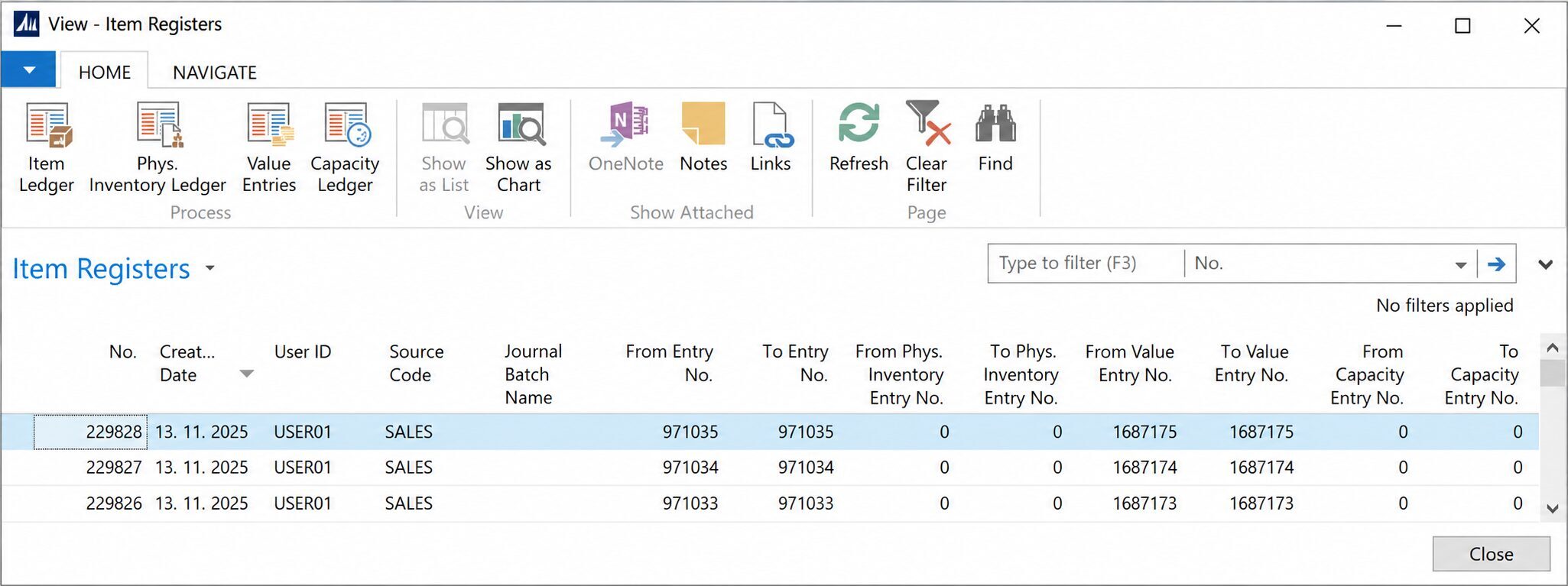
Have you ever needed to find out who posted an inventory transaction and when it was recorded in Microsoft Dynamics NAV?
Item Registers provide a detailed history of inventory posting operations, allowing users to identify who performed a posting, when it occurred, and which inventory entries were created.
In this article, we explain what Item Registers are, what information they provide, and how they can help you investigate inventory discrepancies and verify posted transactions in Microsoft Dynamics NAV.
What Are Item Registers?
Item Registers (Page 117) are a standard feature of Microsoft Dynamics NAV that records information about completed inventory posting operations.
Unlike Item Ledger Entries, which display individual inventory transactions, Item Registers group entries created during a specific posting operation.
Each register contains references to the related entries, making it easier to trace and review posted inventory transactions.
What Information Do Item Registers Provide?
Each register contains useful information about a posting operation, including:
Creation Date – The date when the register was created.
Creation Time – The time when the register was created, where available.
User ID – The user who performed the posting.
Source Code – Identifies the source of the posting, such as sales, purchases, or inventory adjustments.
Journal Batch Name – Identifies the journal batch used, when applicable.
From / To Entry No. – The range of Item Ledger Entries created during the posting.
Value Entry Numbers – References to the related Value Entries.
Phys. Inventory and Capacity Entry Numbers – References to additional entries, where applicable.
Using these details, users can quickly identify which entries were created during a particular posting operation.
When Should You Use Item Registers?
Item Registers are particularly useful when you need to:
Identify which user posted an inventory transaction.
Check when a posting operation was performed.
Review all entries created during a specific posting.
Investigate unexpected changes in inventory quantities or values.
Trace the origin of incorrectly posted inventory transactions.
Verify the results of inventory journal postings and other inventory operations.
Practical Example
Imagine that you discover an unexpected reduction in inventory.
By reviewing Item Ledger Entries, you can identify the transaction responsible for the change.
You can then use Item Registers to locate the corresponding posting register, identify the user who performed the operation, and review other entries created during the same posting.
This information can help determine the cause of the discrepancy and whether corrective action is required.
Important Considerations
Item Registers are designed for reviewing and tracing posted transactions, not for modifying existing entries.
If an incorrect transaction is identified, it must be corrected using the appropriate NAV posting or correction procedure.
Item Registers should also not be considered a complete audit log of all user activities. They record posting registers rather than every change made to data in the system.
Summary
Item Registers answer a key question: "Who posted these inventory entries, when were they posted, and which entries were created?"
They are an essential tool for inventory control, transaction tracing, and troubleshooting in Microsoft Dynamics NAV.
By using Item Registers together with Item Ledger Entries and Value Entries, users can gain a clearer understanding of inventory posting history and identify potential issues more efficiently.